Screen printing is a versatile and creative printing technique that allows beginners to turn their designs into vibrant, professional-looking prints. Whether you want to customize T-shirts, create posters, produce artwork, or start a clothing brand, screen printing offers a practical way to bring your ideas to life.
Although the process may seem complicated at first, understanding the basic tools, preparing your design correctly, and following the proper printing steps can make it much easier to learn. With practice and experimentation, you can develop the skills needed to produce clean, durable, and eye-catching prints.
This guide covers the fundamentals of screen printing, from essential materials and stencil preparation to printing techniques, curing, and troubleshooting.
Understanding Screen Printing
Screen printing is a printing technique that transfers ink onto a surface through a mesh screen. A stencil blocks certain areas of the mesh, allowing ink to pass only through the parts that form the desired design.
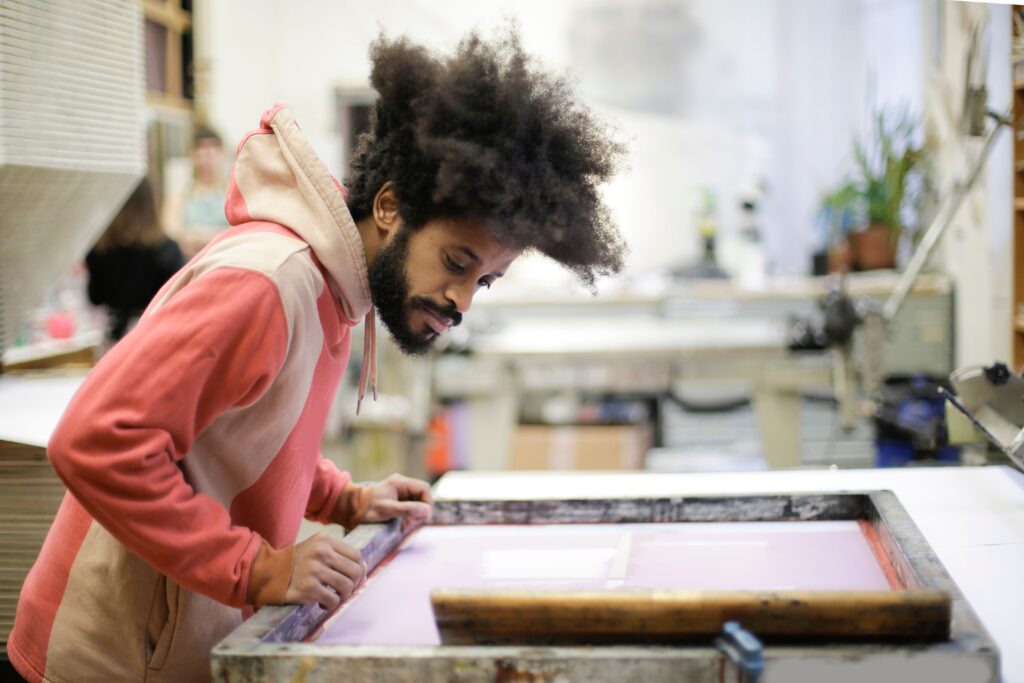
The process typically involves placing the screen over a material, applying ink, and using a squeegee to push the ink through the open areas of the stencil. The result is a printed image with solid colors and clear details.
Screen printing is especially popular because it can produce vibrant colors and durable designs. It is also suitable for producing multiple copies of the same design, making it useful for personal projects and commercial production.
Beginners can start with simple designs featuring one color before progressing to more complicated prints with multiple colors and layers.
Applications of Screen Printing
Screen printing is widely used in the fashion, art, advertising, and promotional industries.
One common application is custom apparel. Businesses, organizations, and independent designers use the technique to print logos, illustrations, slogans, and graphics on T-shirts, hoodies, tote bags, and other fabric products.
Screen printing is also used to create posters, art prints, and promotional merchandise. Artists use it to produce limited-edition artwork, while businesses use it to create branded items for events and marketing campaigns.
For clothing brands, screen printing is particularly useful when producing several garments with the same design. Once the screen has been prepared, the design can be printed repeatedly, helping maintain consistency across a batch of products.
Essential Tools and Materials
Before beginning your first project, prepare the basic tools and materials needed for screen printing. Using suitable equipment can make the process easier and help prevent common printing mistakes.
Screen
The screen is one of the most important parts of the process. It consists of a fine mesh stretched tightly over a frame, usually made of wood or aluminum.
The mesh allows ink to pass through selected areas while blocking the rest of the design. Mesh count, which refers to the number of threads per inch, affects how much ink passes through and how much detail the screen can reproduce.
Lower mesh counts generally allow more ink to pass through and can work well for bold designs. Higher mesh counts are often more suitable for finer details and thinner inks.
For beginners printing simple designs on T-shirts, a screen with a moderate mesh count is a practical starting point. The ideal choice depends on the fabric, ink, and level of detail in the artwork.
Squeegee
A squeegee is a tool with a firm rubber or polyurethane blade used to push ink across the screen. It helps force ink through the open areas of the stencil and onto the material below.
The blade should be appropriate for the screen size and printing surface. A squeegee that is too small may make it difficult to apply consistent pressure across the design.
During printing, hold the squeegee at a suitable angle and apply steady pressure. Pulling it smoothly across the screen helps distribute ink evenly and reduces the likelihood of patchy prints.
Ink
Screen printing ink is specially formulated for different printing surfaces. Choosing the correct ink is essential for achieving vibrant colors and ensuring the design lasts.
Water-based inks are commonly used for fabric printing and can produce a soft feel when applied correctly. Plastisol ink is another popular option for apparel printing, particularly in commercial production, but it requires appropriate curing equipment and careful handling.
Other inks are designed for paper, posters, plastics, or specialty effects. Always check whether the ink is compatible with your chosen material.
Beginners should start with an ink designed specifically for their project rather than using ordinary paint. Follow the manufacturer’s instructions for application, cleanup, and curing.
Additional Supplies
Besides the screen, squeegee, and ink, you may need several other supplies:
- Screen printing frame or press: Holds the screen in position during printing.
- Stencil materials: Photo emulsion or stencil film helps create the design on the mesh.
- Transparent film: Used to prepare artwork for the screen exposure process.
- Light source: Provides the UV light needed to expose a photosensitive emulsion.
- Tape: Helps block unwanted areas of the screen.
- Substrate: The surface being printed, such as a T-shirt, tote bag, or sheet of paper.
- Cleaning supplies: Used to remove excess ink and reclaim the screen when appropriate.
- Protective equipment: Gloves and other protection recommended by the ink and chemical manufacturers.
You do not need an expensive professional setup to begin. A basic screen printing kit can be enough for learning the process and experimenting with simple designs.
Preparing the Design
Proper design preparation is essential for achieving a clean print. Mistakes at this stage can affect the final result, even if the printing technique is correct.
Creating the Stencil
A stencil determines where the ink will pass through the screen. One common method uses light-sensitive emulsion, which hardens when exposed to UV light.
First, prepare your artwork in a format suitable for screen printing. For a basic one-color design, a high-contrast black-and-white image is often easiest to work with. The dark areas of the film block light, while the transparent areas allow light to pass through.
Next, coat the screen with photosensitive emulsion according to the manufacturer’s directions. Allow it to dry in a clean, dark environment. Place the artwork film against the coated screen and prepare it for exposure.
Another option is to use a stencil film designed for screen printing. This can be a practical alternative for beginners who want to avoid some of the steps involved in working with photo emulsion.
Screen Exposure
When using photo emulsion, the coated screen is exposed to UV light with the artwork positioned correctly against it. Light hardens the emulsion in the exposed areas, while the artwork protects selected areas from the light.
After exposure, rinse the screen with water according to the emulsion manufacturer’s instructions. The unexposed emulsion should wash away, opening the mesh where the design needs to print.
Allow the screen to dry completely before printing.
Exposure time depends on the emulsion, light source, screen mesh, and distance from the light. Too little exposure can cause the stencil to break down during printing, while too much exposure may make it difficult to wash out the design.
For consistent results, follow the emulsion instructions and conduct an exposure test when necessary.
The Printing Process
Once the stencil is ready, you can begin printing. Work in a clean area, prepare your materials in advance, and test the design before printing on finished products.
Setting Up the Screen
Place the material on a stable, flat surface. If you are printing on a T-shirt, make sure the fabric is smooth and that the layers underneath are not folded or bunched up.
Position the screen over the material and secure it using a screen printing press, hinges, or another suitable setup. The screen should remain stable throughout the printing process.
For apparel, use a platen or firm support designed for garment printing. This helps keep the fabric flat and prevents the ink from transferring to the back of the shirt.
Check the screen alignment before applying ink. If the design is not positioned correctly, the finished print may appear crooked or uneven.
Applying the Ink
Place a small line of ink near one edge of the screen, above the design. Hold the squeegee at an appropriate angle and pull it across the screen with steady pressure.
The movement forces ink through the open areas of the stencil and onto the material. Depending on the ink and setup, you may need a controlled flood stroke to spread ink over the design before making the printing stroke.
Avoid using excessive ink or applying inconsistent pressure. Too much ink can create thick, messy prints, while insufficient pressure may leave parts of the design incomplete.
Lift the screen carefully after printing and inspect the result. If you are printing several items, repeat the same process while maintaining consistent placement and pressure.
Before printing an entire batch, test the design on scrap fabric or another inexpensive material. This gives you an opportunity to adjust the ink amount, alignment, and printing technique.
Curing the Print
Curing is an important step because it helps the ink develop the durability required for its intended use. The correct curing method depends on the type of ink and the material being printed.
Heat Setting
Many fabric inks require heat setting to ensure the design adheres properly and withstands washing. Depending on the product, this may involve a heat press, conveyor dryer, or another suitable curing system.
Always follow the manufacturer’s specified temperature, time, and other curing requirements. Different inks have different needs, so one setting should not be assumed to work for every product.
For example, some water-based fabric inks require sufficient heat to dry and cure fully, while plastisol inks need to reach their specified curing temperature throughout the ink layer.
A print that feels dry on the surface may not be fully cured. If the ink has not reached the required conditions, the design may crack, peel, or fade after washing.
Checking Print Durability
After curing, allow the item to cool as recommended before testing it. Inspect the design for uneven coverage, cracking, or areas where the ink has not bonded properly.
For apparel, a wash test can help determine whether the print is durable enough for sale or regular use. Follow the ink manufacturer’s recommended washing and care instructions when conducting the test.
Avoid stretching or washing the garment prematurely if the ink requires additional curing or cooling time.
Troubleshooting Tips for Beginners
Mistakes are a normal part of learning screen printing. Understanding their possible causes can help you improve your technique and avoid wasting materials.
Ink Consistency
Ink that is too thick may not pass smoothly through the mesh, while ink that is too thin may spread beyond the intended design or produce weak coverage.
Use ink formulated for your printing method, and stir it according to the manufacturer’s instructions. Some inks may need specific adjustments, but avoid adding water, solvents, or other substances unless the manufacturer permits it.
If the print looks patchy, check whether the mesh is clean, the ink is suitable for the screen, and the squeegee pressure is consistent.
Screen Alignment
Poor alignment can cause crooked designs, uneven placement, or overlapping colors in multicolor prints.
Secure the screen and material before printing. For repeated prints, use registration marks, guides, or a press with alignment features to maintain consistent positioning.
When printing multiple colors, mark the position of each screen and test the alignment on scrap material before moving to the final products.
Clogged Mesh
Ink or dried emulsion can block parts of the mesh, preventing ink from passing through and leaving gaps in the design.
Inspect the screen between prints and clean it when necessary using products suitable for the ink and stencil system. Avoid allowing ink to dry in the mesh during long pauses.
If the stencil itself is damaged, you may need to repair it with an appropriate screen blockout product or prepare a new screen.
Smudges and Uneven Prints
Smudging may occur when the screen moves during printing, the fabric shifts, or too much ink is applied. Uneven prints may also result from inconsistent squeegee pressure or an improperly prepared screen.
Keep the printing surface stable, use a controlled squeegee stroke, and inspect each print before continuing. If the problem persists, change one variable at a time so you can identify the cause.
Poor Ink Durability
If the print cracks, peels, or fades after washing, the ink may not have been fully cured or may not be compatible with the material.
Check the curing instructions, verify that the required conditions were achieved, and confirm that the ink is suitable for the fabric. A wash test before production can help identify problems early.
Experimenting with Screen Printing Techniques
Once you are comfortable with basic one-color printing, you can explore techniques that make your designs more distinctive.
Layering Multiple Colors
Multicolor screen printing involves using separate screens or stencils for different colors. Each layer must be positioned accurately so the colors align and form the intended image.
Begin with two-color designs that use clear shapes and limited detail. Practice registration on scrap material before printing on finished products.
You should also consider the order in which the colors are printed and how the inks interact. Some designs benefit from printing lighter colors first, while others require a different sequence depending on the artwork and ink system.
Planning the design carefully can reduce registration problems and create a more professional finish.
Specialty Inks
Specialty inks can add texture, shine, or visual effects to a print.
Metallic inks create a reflective appearance, while glow-in-the-dark inks produce a distinctive effect under suitable lighting conditions. Puff inks expand during the required curing process to create a raised texture.
Other options include glitter, reflective, and high-density inks. Each type has specific requirements for mesh selection, application, and curing, so review the manufacturer’s instructions before using it.
Beginners should experiment with one specialty ink at a time. This makes it easier to understand how the ink behaves and how it affects the finished design.
Printing on Different Materials
Although screen printing is commonly associated with clothing, it can also be used on paper, canvas, and other compatible surfaces.
Each material has different properties that affect ink absorption, adhesion, and drying. Fabric may stretch or absorb ink differently from paper, while some synthetic materials may require specially formulated inks.
Before printing on a new surface, confirm that the ink is compatible with the material and test the process on a sample.
Creating Your Own Style
Screen printing gives artists and designers the freedom to experiment with illustrations, typography, patterns, and original artwork.
You can create minimalist graphics, bold lettering, abstract designs, or vintage-inspired prints. Combining different colors, textures, and printing methods can help you develop a recognizable visual style.
Keep samples of your experiments and record details such as the ink used, screen mesh, curing method, and adjustments made. These notes can help you repeat successful results and improve future projects.
Conclusion
Screen printing is a rewarding skill that combines creativity with practical technique. By learning how the screen and stencil work, choosing the right materials, preparing your design carefully, and applying ink consistently, you can begin producing attractive prints for personal projects or a clothing business.
The key is to start simple and practice regularly. Focus on one-color designs before moving to multicolor prints and specialty inks. Test your work, follow the manufacturer’s safety and curing instructions, and use mistakes as opportunities to improve.
With patience and experimentation, screen printing can become a valuable skill for creating custom apparel, artwork, promotional products, and other personalized items.
Key Takeaways:
- Screen printing transfers ink through a mesh screen using a stencil.
- The essential tools include a screen, squeegee, suitable ink, and a material to print on.
- Proper stencil preparation and screen exposure help produce clear designs.
- Consistent pressure and accurate alignment improve print quality.
- Correct curing is essential for durable prints, especially on clothing.
- Troubleshooting ink consistency, clogged mesh, and alignment problems helps reduce waste.
- Layering colors and experimenting with specialty inks can expand your creative options.
- Start with simple designs, test your materials, and follow the manufacturer’s instructions for safe and reliable results.
Elevate your screen printing knowledge with Parsons Streetwear Essentials for advanced training in fashion printing and design.